Ostool | Car Rental Management Software
September 30, 2025

What Is Car Rental Management Software?
Car rental management software is an integrated cloud-based system specifically designed to help you organize and manage your business in the car rental sector. It provides a secure platform that manages various aspects of your company, offering accurate data such as rental days, maintenance status, available and rented vehicles, branch and employee information, as well as detailed monthly and yearly financial reports.
Additionally, you can create a dedicated profile for each customer to track their requirements and organize contracts. The system also provides a detailed customer database, including the total number of clients, categorized by type—new, active, or inactive—helping you deliver better customer service.
Key Services Provided by Car Rental Software
Reservation Management
The software provides a complete dashboard to manage reservations easily and professionally, including:
- Reservation Records: A full log showing past and current reservations with details such as reservation number, vehicle number, reservation status (active, completed, or canceled), customer name, phone number, booking reference, pickup and planned return dates, actual return date, total amount, insurance, pickup and return branches, and creation date. Advanced filtering options allow quick access by reservation number, customer name, vehicle, or status.
- Reservation Summary: A mini-dashboard analyzing reservation status over a specific period, showing confirmed, canceled, and pending reservations.
- Reservation Statistics: Displays the total number of reservations monthly and yearly, using visual charts to track performance and trends.
- Add New Reservation: A smart form that allows you to create new bookings in minutes, including vehicle and customer details, reservation specifics, and a summary.
Vehicle Management
A complete dashboard for managing all vehicles in your fleet:
- Fleet List: Displays all vehicle details, including name, license plate, brand, model, year, color, status, mileage, daily/weekly/monthly rental rates, transmission type, and fuel type. Allows filtering, keyword searches, and monthly fleet summaries, including revenue, total vehicles, maintenance costs, and currently rented cars.
- Vehicle Tracking: Monitors each vehicle’s status—rented or available, under maintenance or idle—while tracking rental counts, mileage, maintenance costs, and GPS location.
- Favorite Vehicles List: Save frequently rented or priority vehicles for quick access.
- Add New Vehicle: A quick form to add a new vehicle with all essential details, including financial and operational information.
Maintenance Management
A full panel to monitor maintenance for all vehicles: total fleet, cars currently under maintenance, and ready-to-use vehicles. The maintenance log includes vehicle name, license plate, maintenance type, service center, start and end dates, status, mileage at service, maintenance costs, branch, and record creation date. You can also add new maintenance tasks easily and export records for reporting.
Contract Management
Manages all rental contracts with a dashboard showing total contracts, active contracts, and expired contracts. View detailed contract information, including reservation number, vehicle number, status, customer info, booking reference, pickup and return dates, total amount, insurance, branches, and creation date. Contracts can be documented, searched, and exported for reporting.
Customer Management
A comprehensive dashboard for managing customers, showing total registered clients, new customers, and those with active rentals. Customer profiles include full name, email, phone number, city, address, customer type (individual or company), rental type, ID, visitor country, authorized driver info, blacklist status, and registration date. The system allows registering new clients and creating dedicated profiles to track needs and contracts.
Company Management
Provides full control over the company’s organizational structure, managing users, roles, and branches. Create employee profiles including name, ID, phone, email, role, permissions, and branch assignment. Manage branch operations independently and assign roles and permissions to ensure smooth workflow.
Statistics Dashboard
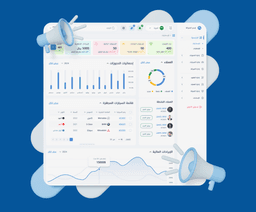
Gives a comprehensive overview of company performance with automatically updated KPIs: total customers, available vehicles, current reservations, monthly revenue, and active contracts. Additional details include customer status, monthly/yearly reservation statistics, and vehicle availability.
System Customization
Ostool offers high flexibility, allowing you to request additional modules or features according to your company’s needs. Whether it’s driver management or other operational requirements, the support team can develop and integrate them to match your workflow.
Benefits of Car Rental Management Software
- Company Management: Enables professional management of your company through a single, secure control panel.
- Employee Management: Organizes the administrative structure by creating profiles, assigning roles and permissions, and linking staff to branches.
- Error Reduction: Minimizes human errors and saves time by automating manual processes such as reservations, contracts, and data updates.
- Enhanced Customer Experience: Helps provide better service by maintaining comprehensive customer profiles, tracking preferences, and managing past bookings efficiently.
Related Articles

Ostool System | Unified Gateway for Tajeer and TAM Compliance
March 2, 2026
Ostool – Car Rental Management System
January 10, 2026

The Future of the Car Rental Market in Saudi Arabia
December 10, 2025

How Do Car Rental Management Systems Reveal Market Trends?
November 20, 2025

5 Risks Threatening the Car Rental Sector in Saudi Arabia
November 14, 2025